OneNote to Joplin Readiness
Windows tool to check system readiness before migrating from OneNote to Joplin.
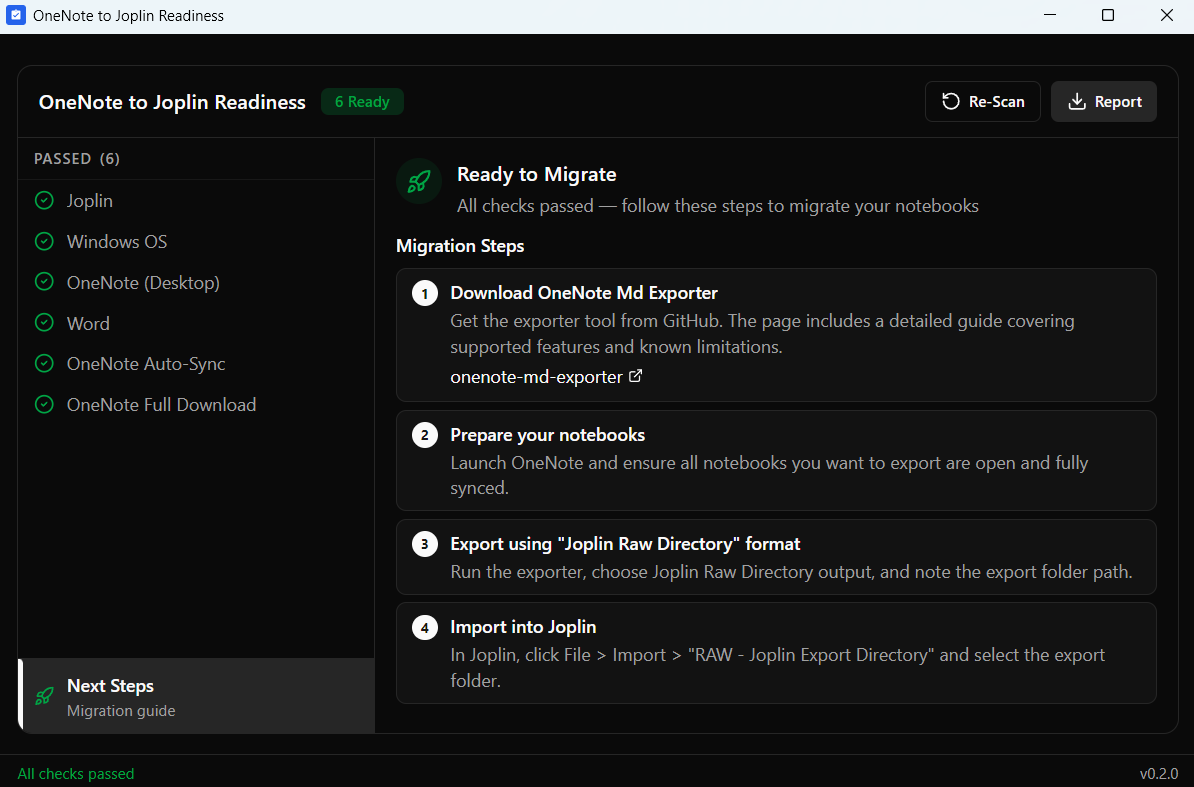
Migrating from Microsoft OneNote to Joplin is doable, but the execution can feel pretty complex.
There's a solid migration tool out there, but the many requirements make it easy to run into blockers before you even get started.
This Readiness Tool runs first to audit your Windows setup and ensure a successful migration.
How it works
- Scan — Audits your OneNote version, COM automation, and dependencies.
- Fix — Provides clear instructions if a setting or version is incorrect.
- Ready — Once everything is green, you can migrate with confidence.
What it checks
- Joplin Desktop installation
- Windows 10/11 compatibility
- OneNote Desktop (not the Store version) + working COM automation
- Microsoft Word + working COM automation
- OneNote "Sync-on-close" settings
- Notebook status (checks for local copies, not "cloud stubs")
The actual migration runs through onenote-md-exporter, a free open-source console application. The Readiness Tool includes guidance on where to get it and how to use it.
The tool is read-only. It doesn't touch your notes, files, or system settings. Source code is public on GitHub if you want to verify that yourself.
How to get it
About the Author
Peter van Barneveld
Innovation Manager exploring practical paths to digital autonomy. He tests what actually works in daily use. His approach: figure it out, document the journey, share honest results.